
How to Recycle Laptops & Computers
Laptops and computers are classed as Waste Electrical and Electronic Equipment (WEEE) when they are discarded. They should be reused or recycled through an appropriate WEEE route rather than placed in general waste.
Businesses should back up and securely remove any sensitive data before arranging collection by an authorised waste carrier. Old laptops can then be tested for reuse or sent to an appropriate treatment facility, where useful components and materials are recovered.
Householders can normally use retailer take-back schemes, local recycling centres or suitable electrical recycling points.

How to recycle a laptop
Before recycling a laptop, check whether it can still be reused. Working devices may be suitable for refurbishment, resale, donation or redeployment within your business.
If the laptop has reached the end of its useful life:
- Back up any files you need – move important data to secure cloud storage, a company server or another approved device.
- Remove business and personal data securely – use an appropriate data-erasure process before the laptop leaves your control.
- Keep batteries with the device unless they are designed to be removed safely – damaged lithium-ion batteries may need a separate waste route.
- Arrange an appropriate WEEE collection – businesses should use an authorised waste carrier or compliant IT recycling provider.
- Keep the correct paperwork – retain the relevant waste transfer documentation for commercial collections.
Old laptops should not go in general waste or standard mixed recycling.
How should businesses recycle old laptops and computers?
Businesses should handle unwanted laptops and computers through an appropriate WEEE reuse or recycling route.
Where equipment cannot be reused, arrange collection through an authorised waste carrier or IT recycling provider. The devices should be taken to a suitable facility for testing, treatment and material recovery.
Businesses must also meet their waste duty of care. This includes describing the waste correctly, using authorised operators and keeping the required waste documentation.
For laptops and computers that hold company, customer or employee information, secure data removal should form part of the disposal process before the equipment leaves your control.
What happens to recycled laptops?
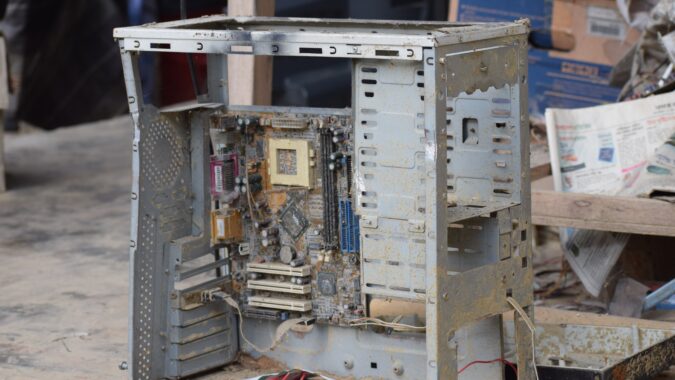
Computers and laptops are made from a combination of different materials including plastic, metal, glass, and precious metals. Most computers are made from up to 23% plastic but can also contain toxic substances such as lead, mercury, cobalt, and more. Safely separating all elements is vital to recycle computer parts efficiently.
Once old computers are collected, they’re transported to a recycling centre for processing. The exact steps can vary between facilities, but the general computer recycling process is:
- Sorting – old computers are sorted by their type and separated for processing. Computers with cathode ray tubes (CRT) are sent for processing in one line, for example.
- Testing – depending on the facility, the computers and parts may be tested. If they still work and are in decent condition, they may be sent for upgrading and refurbishing, rather than recycling. These refurbished computers are then sold or donated.
- Disassembling – the main computer components are removed, such as the speakers, circuit board, sound and graphics cards, and hard disks. Normally this is done manually to ensure such computer parts can be reused and sold to computer manufacturers.
- Separating – further dismantling and separating of components follows with the plastics, ferrous and non-ferrous metals, and CRT elements. The CRT parts contain types of hazardous materials including lead, cadmium, mercury, phosphors, and barium. These are then sent to special facilities to remove the likes of lead from the CRT glass panel.
- Data destroying – hard drives and processors are shredded to ensure all data is destroyed. This waste can then be recycled into aluminium ingots and used in the automotive sector.
- Shredding – after all useful and hazardous computer parts are recycled, the rest is separated by material and shredded. This includes any plastic casing, wires, circuit boards, and other metals. It’s then screened and precious metals may be smelted – both processes help remove any valuable components.
- Reusing – any recovered materials such as plastics, glass, and metals are sent to specific material recyclers for further processing. These materials are reused to manufacture new products, such as to create fresh steel and metallic products.
What to do before recycling a computer
Before you recycle a computer from your home or business there are two important things to do – back up your data and wipe the hard drive. This ensures you maintain all the key files, information, and data you need from your old computer and that nobody should get their hands on any sensitive or personal information.
You can back up the data on an external hard drive, USB stick, server, or cloud storage. Check that you can access it and that everything is secure. Once you’re certain it’s all backed up you should then use the factory reset option to wipe your computer.
If you want to be extra safe you can remove the hard drive for safekeeping or destruction. Computer cleaning kits are also available, but you only really need to consider using one when you plan to resell your old computer or its parts.
Why is it important to recycle old computers?
Recycling old computers is important to prevent them ending up in landfill. If old computers go to landfill, then chemicals from the plastics and other hazardous materials contained in them can leach into the ground, air, and nearby water. This negatively affects the local environment and adds to pollution levels and CO2 emissions.
When computers aren’t recycled then new materials are also required to create fresh IT equipment. This requires lots of energy and the use of raw materials, which can damage natural habitats. Computer recycling uses much less energy and materials to manufacture new computers, which also reduces greenhouse gas emissions.
Where can you recycle laptops and computers?
Depending on whether you need to get rid of a computer from your business or home there are various ways to recycle computers. The main places where you can recycle computers are:
- Returning it to a retailer – many high-street retailers that sell electronic goods accept old computers for recycling, whether you bought it there originally or not.
- Calling the computer manufacturer – most computer manufacturers have returns programs that accept old machines that they arrange recycling for.
- Visiting your local household waste recycling centre – lots of HWRCs have WEEE bins and sometimes separate bins for old computer recycling.
- Donating your old computer to a charity shop – if your old PC still works then many charity shops or community projects may accept it to use or sell.
- Reselling online – Facebook Marketplace, eBay, and Gumtree are popular websites to sell old computers and parts whether they work or not.
- Arranging collection from your business – companies and organisations can arrange commercial waste collection of old computers by professional waste management firms to ensure they’re recycled.
Ways to reduce computer waste
The main way to reduce computer waste is to hold onto working computers and laptops for longer and avoid throwing them out. If a computer still works then consider upgrading its parts – such as the graphics, sound cards, and processor – rather than buying a brand-new machine. This reduces the need for new materials, prevents waste, and saves you money.
Another key action to minimise computer waste is to donate old machines rather than send them for recycling. Many charities and community projects will accept working PCs to sell or use. Even if your old computer is broken, some charities and individuals will take them to repair and then use or sell it.
Arrange computer recycling collection
Send any old computers from your business for recycling with Business Waste. We provide free bins and containers of various sizes to store computers, IT equipment and any type of WEEE waste on-site. You just pay for collection and our licensed waste carriers will remove it at an agreed time.
They’ll transport your old computers to a nearby waste management facility for safe and legal recycling. You also receive a free duty of care certificate for peace of mind that your old business computers are recycled. Arrange collections as a one-off or on a daily, weekly, or fortnightly basis wherever you’re based in the UK.
Get a free quote for computer waste collections whatever your industry. Contact us online or call 0800 211 8390 and one of our friendly team will provide a no-obligation quote tailored to your needs.
Learn more about computer recycling
-
How to dispose of a computer monitor

-
WEEE waste collection
-
Office waste management


Computer recycling FAQs
-
Who needs computer recycling?
-
Do I need to wipe a laptop before recycling it?
Yes, if it contains personal or business data. Back up anything required first, then use an appropriate secure data-erasure process.
-
Can old laptops be reused instead of recycled?
Yes. Working laptops may be suitable for refurbishment, resale, donation or reuse within an organisation once data has been removed securely.
-
Can laptop batteries be recycled?
Yes. Lithium-ion laptop batteries require an appropriate battery or WEEE recycling route. Damaged batteries may need specialist handling.
-
Is a laptop classed as WEEE?
Yes. A discarded laptop is electrical and electronic equipment and falls within the WEEE waste framework.



Have your waste collected
Get a fast FREE quote for your waste collection 0800 211 83 90
- Free quote within 1 hr
- Any type of waste
- FREE bins and delivery
- We cover all of the UK